Sheet music app for bandoneon: tango, milonga, vals
Keep the marcato in time, repeat passages, turn pages with your foot – for Apple and Android.

The pulse of the tango
Tango lives on marcato, on a step on every beat.
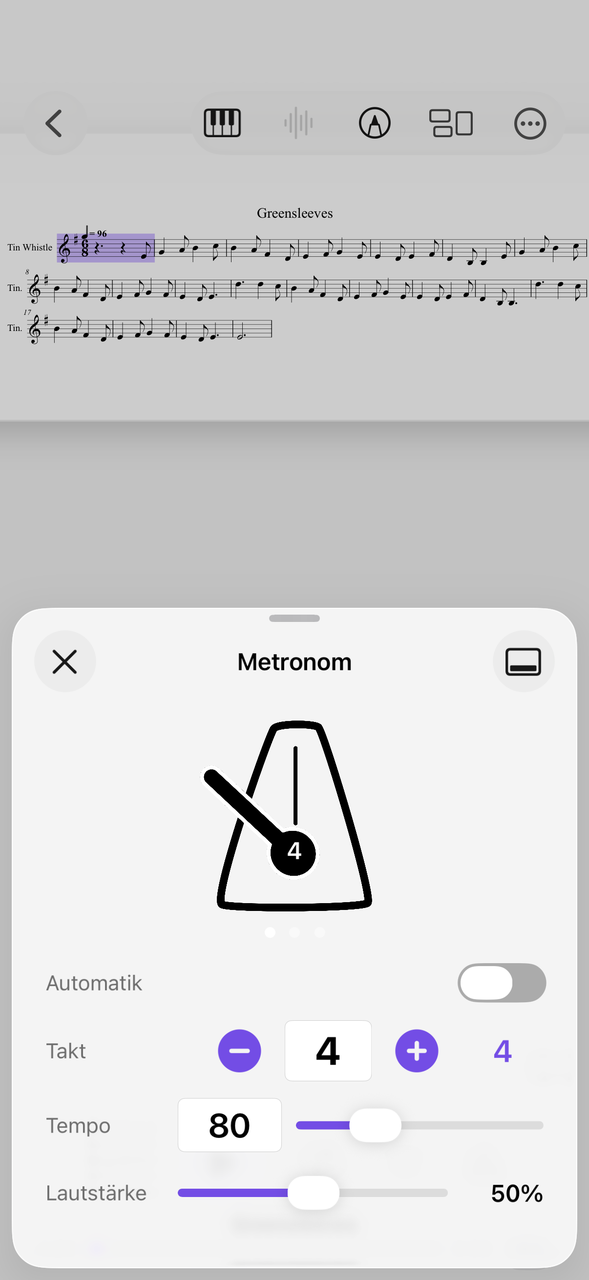
Whether a slow tango in 4/4, a fast milonga in 2/4 or a vals in 3/4: the metronome has three views, and you set time signature, tempo and volume for each piece.
On the Apple Watch you feel the beat as a vibration and change the tempo with the Digital Crown. This works only with the Apple Watch.
Opening, closing, turning the page
The bandoneon rests on your knees, both hands are on the buttons.
The note depends on the direction of the bellows: opening and closing sound different notes. That leaves no hand free to turn the page. A Bluetooth pedal turns pages forward and back, and a tap on the edge of the page works, too.
You add the bellows direction or a fingering to the music with the pen, in PDF and MusicXML.
Practicing syncopation in a circle
The 3-3-2 rhythm needs to be internalized.
The typical 3-3-2 pattern in tango comes once you play it again and again. Set the start and end and let the passage run in a loop, slowly at first, then faster.
This applies to MusicXML and MIDI, and likewise to a backing track with, for example, double bass and piano.
How to work up a tango
From pulse to phrase.
Internalize the pulse
Set the metronome to a calm tempo and practice the marcato step.
Loop variations
Repeat tricky runs or syncopations as a loop.
Play along with a recording
Attach an orchestra recording or an accompaniment track to the piece.
Accordion and concertina are also among the accordions and harmonicas.
Everything for rehearsal and practice
NovaNota can do more – for your instrument as well as for the whole band, choir or orchestra.
Pen annotations
Fingerings, breath marks, chords: write straight onto the music with the pen – in PDF and MusicXML, with several colors and markers.
Turn pages with your foot
Bluetooth pedals are recognized right away, and a tap on the edge of the page turns it, too. Your hands stay on the instrument.
Metronome and A–B repeat
You set time signature and tempo right on the piece. You practice tricky bars as a loop – NovaNota remembers the range for every piece.
Record yourself
Record your practice right in the app and listen back to how your intonation and tone sound. The recording is automatically attached to the piece.
Rehearsals in the calendar
Orchestra rehearsals, concerts and lessons with meeting point, dress code and program. You can simply subscribe to the calendar of your orchestra, choir or band.
On all your devices
Your library stays up to date via iCloud (on Apple devices), NextCloud or Google Drive – on tablet, phone and Mac, Apple or Android.
Frequently asked questions
Does NovaNota read Argentine bandoneon notation?
No. NovaNota displays PDF scores and plays back MusicXML and MIDI. It does not read special button notations, not even for the bandoneon.
How do I keep the beat in rehearsal?
With the metronome in three views. On the Apple Watch you feel the beat as a vibration.
How do I turn pages?
With a Bluetooth pedal or a tap on the edge of the page.
Which devices does NovaNota run on?
On iPhone, iPad and Mac with Apple silicon, as well as on Android phones and tablets. There is a separate app for Apple Watch.
How much does the app cost?
Free for up to three pieces, with no time limit and no account. NovaNota Pro unlocks unlimited pieces and notation editing.
Try it with your own sheet music.
Free for up to three pieces, with no time limit and no account – for Apple and Android.